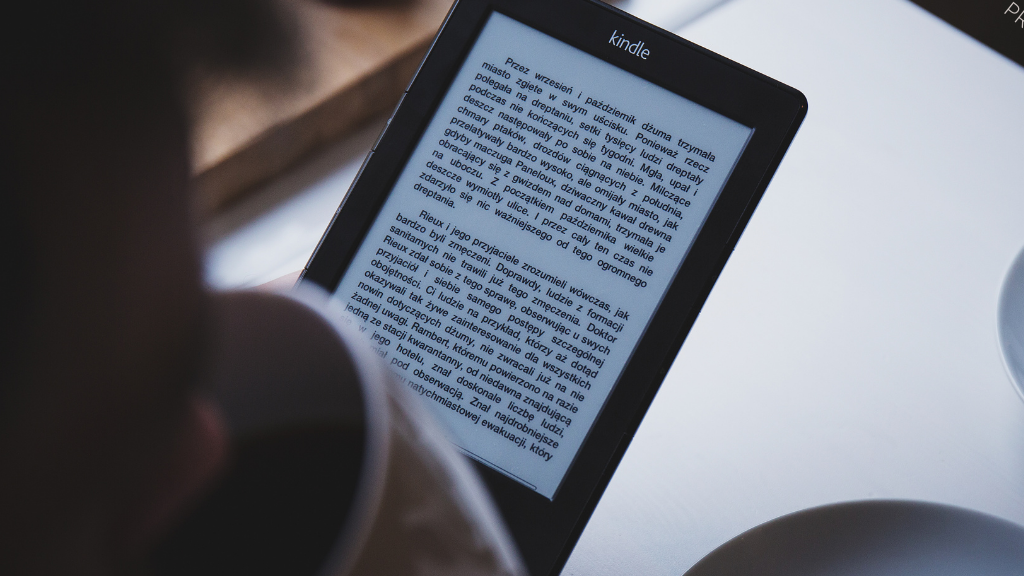
The Kindle website is a user-friendly platform for book lovers and avid readers to explore and purchase a wide range of digital books, magazines, and newspapers. It offers a vast library of e-books across various genres and authors, allowing users to browse bestsellers, new releases, and personalized recommendations.
The website also provides a seamless purchasing experience, allowing users to buy and download e-books directly to their devices or read apps. Additionally, the Kindle website allows self-published authors to share their work through Kindle Direct Publishing, enabling them to reach a global audience and gain recognition for their literary creations. Overall, the Kindle website serves as a comprehensive hub for digital reading.
READ THIS: –The Top Financial Apps of 2024: Find the Best Budget App for Your Finances
How to Use the Kindle Website
To use the Kindle website, you can follow these simple steps:
1. Create an account.
If you don’t already have an Amazon account, you will need to create one to access the Kindle website. Visit the Amazon website and follow the prompts to set up your account.
2. Access the Kindle Store:
Once you have an Amazon account, navigate to the Kindle Store on the website. Here, you can explore a vast selection of e-books, magazines, and newspapers.
3. Browse and search:
Use the search bar or browse through categories to find the e-books you are interested in. You can also explore bestseller lists, new releases, and personalized recommendations based on your reading history.
4. Purchase or download free books:
When you find a book you want to read, you can purchase it and download it directly to your Kindle device or reading app. Some books may also be available for free.
5. Manage Your Library:
The Kindle website allows you to manage your digital library, organize your books into collections, and access your reading material from any compatible device.
6. Customize Reading Settings:
Once you have downloaded a book, you can customize your reading experience by adjusting settings such as font size, background color, and more.
Kindle Website Features
Here is a list of features available on the Kindle website:
- Bookstore
- Reading Samples
- Kindle Unlimited
- Personal document upload
- Whispersync
- Personalization Settings
- Highlighting and note-taking
- Dictionary Lookup
- Collections
- Social Sharing
These features allow users to browse and purchase books, preview samples, access a library of unlimited books, upload personal documents, sync reading progress, personalize reading settings, highlight and take notes, look up definitions, organize books into collections, and share quotes on social media.
Kindle Website Tips and Tricks
To maximize your Kindle experience, consider subscribing to Kindle Unlimited for access to a vast library of e-books and audiobooks at a fixed monthly fee.
Keep an eye out for daily deals and discounted e-books, which can offer substantial savings on popular titles.
Use the “Try a Sample” feature to read a portion of a book for free before purchasing.
Organize your library by using the “Manage Your Content and Devices” section to create collections and manage your e-book collection efficiently.
Use Whispersync technology to sync your reading progress across devices, allowing you to pick up where you left off.
If enabled by the publisher, you can lend eligible Kindle books to a friend for a specified duration.
Finally, explore the “Kindle for the Web” feature to read e-book samples in your web browser without the need for a Kindle device or app.
Kindle Website FAQs
While I don’t have access to specific FAQs from the Kindle website, I can provide some general questions that are often addressed in FAQs for e-book platforms like Kindle:
1. How do I purchase and download e-books from the Kindle website?
2. What devices are compatible with the Kindle e-books?
3. Can I access my Kindle e-books offline?
4. How do I manage my Kindle library on the website?
5. Are there any subscription services available for accessing e-books on the Kindle website?
6. Can I lend or share my Kindle e-books with others?
7. What is Kindle Direct Publishing, and how can I use it to self-publish my work?
8. Are there any special features or tools available for enhancing the reading experience on the Kindle website?
9. How do I troubleshoot common issues with Kindle e-books, such as formatting problems or download errors?
10. What are the benefits of subscribing to Kindle Unlimited?
These are just a few examples of the types of questions that might be addressed in a Kindle website FAQ section. If you have specific questions about the Kindle website, I recommend visiting the official website or contacting their customer support for detailed and accurate information.
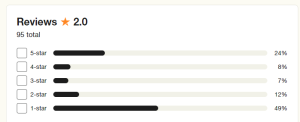
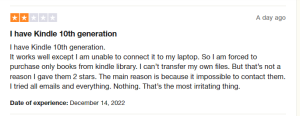
Kindle Website Customer Reviews
Kindle Website Pros and Cons
Alternatives to the Kindle Website
Some popular alternatives include:
1. Apple Books: Apple’s e-book platform offers a wide selection of digital books and audiobooks for users of Apple devices.
2. Google Play Books: Google’s e-book service provides a diverse collection of e-books and audiobooks that can be accessed across various devices.
3. Kobo: Kobo offers a range of e-readers and an extensive e-book store, catering to readers who prefer a different ecosystem from Amazon.
4. Barnes & Noble Nook: The Nook e-book platform provides a variety of digital books and e-readers, offering an alternative to the Kindle ecosystem.
5. Scribd: Scribd is a subscription service that provides access to e-books, audiobooks, and other digital content for a monthly fee.
6. OverDrive: OverDrive is a digital reading platform that partners with libraries to offer a wide selection of e-books and audiobooks for borrowing.
Conclusion
To sum up, the Kindle website is a useful resource for getting access to an extensive collection of e-books and other digital reading material. It provides users with accessibility and convenience with features like Kindle Unlimited, easy purchase, and tailored suggestions.
However, a variety of choices for obtaining e-books and digital material are offered by platforms like Apple Books, Google Play Books, Kobo, Barnes & Noble Nook, Scribd, and OverDrive for people looking for alternatives. In the end, a person’s reading habits, preferences, and gadget compatibility will determine which platform they choose.